Best ERP Software for Schools in Bihar: A Complete Guide
Managing admissions, student records, fee collection, attendance, and examinations manually can put pressure on school administrators. Discover how the right school ERP system can simplify daily operations, improve communication with parents, and help schools in Bihar manage their institutions more efficiently.

VidyalayBox Team
Education Technology Team
Best ERP Software for Schools in Bihar: How to Simplify Daily School Management
Running a school involves much more than classroom teaching. School administrators must manage admissions, maintain student records, track attendance, collect fees, prepare examination results, and communicate regularly with parents. When these responsibilities depend on registers, spreadsheets, and separate applications, even routine tasks can become time-consuming.
For schools across Bihar, managing these activities efficiently is essential for maintaining organized operations and providing a better experience for teachers, students, and parents.
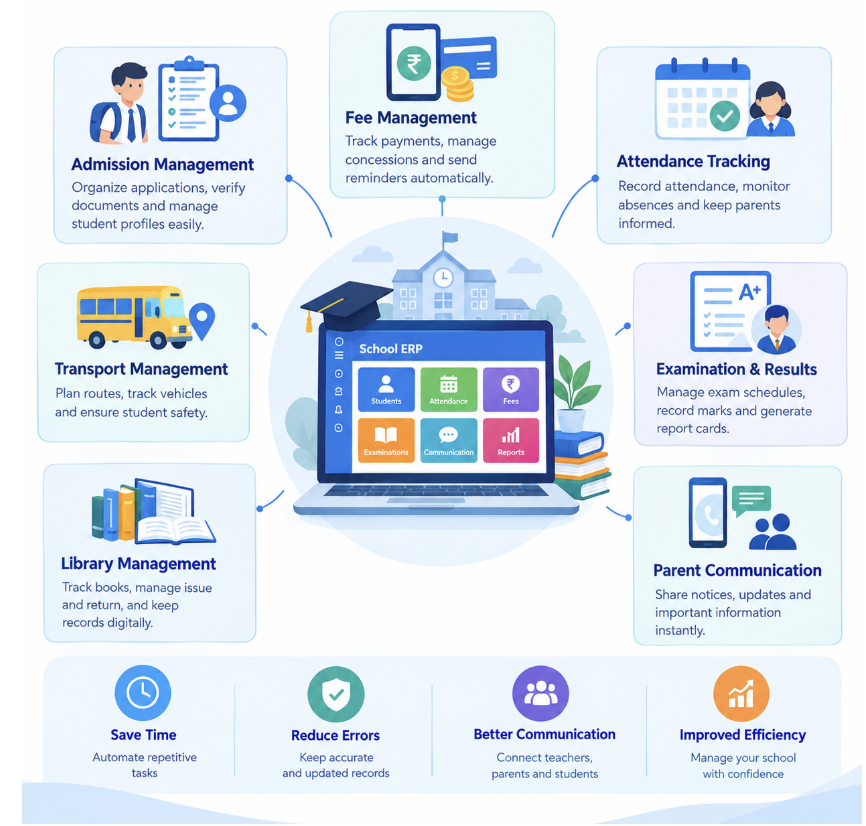
A school Enterprise Resource Planning (ERP) system brings important administrative and academic activities together on a single digital platform. Instead of managing information separately, school teams can access connected records, automate repetitive tasks, and make decisions using more organized data.
Why Do Schools in Bihar Need a School ERP System?
Many schools experience similar operational challenges, regardless of their size or location.
Admission records may be scattered across different files. Accountants may spend hours preparing fee reports. Teachers may have to calculate attendance manually, while parents wait for updates about homework, examinations, or school activities.
These issues can create unnecessary administrative pressure and increase the possibility of errors.
A school ERP system can help address these problems by centralizing essential information and standardizing daily processes.
Key benefits include:
-
Less paperwork: Maintain digital student records instead of relying entirely on physical registers.
-
Better fee tracking: Monitor payments, outstanding balances, concessions, and instalments.
-
Faster attendance management: Record attendance and communicate absences to parents.
-
Simplified examinations: Organize marks, report cards, and examination records.
-
Improved communication: Share important notices and updates with parents more efficiently.
-
Centralized reporting: Access useful academic and administrative information from one platform.
The objective is not simply to digitize existing paperwork. It is to make school operations easier to manage and information more accessible to authorized users.
1. Simplify Student Admissions and Record Management
Admission season can create a substantial workload for school offices. Staff members must collect application forms, verify documents, allocate classes, maintain contact details, and update student registers.
When these activities are handled manually, missing documents and duplicate records can create delays.
A suitable ERP system can organize the admission process, maintain digital student profiles, and make relevant documents easier to retrieve. Once a student is enrolled, the information can support other activities, including attendance, fee management, and academic reporting.
Schools should look for features such as digital admission forms, document uploads, student profile management, and easy record searching.
A centralized student information system also helps administrators maintain more consistent records throughout the academic year.
2. Make Fee Collection and Financial Tracking Easier
Fee management is one of the most important responsibilities of a school administration team. Schools must maintain fee structures, record payments, apply approved concessions, track outstanding dues, and provide receipts.
Manual processes can make it difficult to identify unpaid fees or reconcile payment records accurately.
School fee management software can simplify these tasks through configurable fee categories, instalment schedules, digital receipts, payment tracking, and automated reminders.
For schools that accept digital payments, integration with supported payment gateways can make the payment process more convenient for parents.
Before selecting a solution, administrators should confirm that it supports their actual fee policies, including late fees, concessions, sibling discounts, and different payment schedules where applicable.
Clear financial records help schools monitor collections more effectively and reduce repetitive administrative work.
3. Improve Student Attendance and Parent Communication
Attendance records are important for monitoring student participation and identifying recurring absences. However, recording attendance in registers and preparing reports manually can take time, particularly in larger schools.
A digital attendance system allows teachers to record attendance electronically and helps administrators review daily, monthly, or class-wise reports.
Some platforms can also send SMS or WhatsApp notifications to parents when a student is marked absent, subject to the school's configuration and the availability of supported integrations.
This creates a more organized communication process and helps parents receive important information promptly.
Schools should also check whether the system supports leave management, period-wise attendance, correction procedures, and appropriate access controls.
4. Organize Examinations, Marks, and Report Cards
Examination periods often increase the workload for teachers and administrative staff. Schools need to prepare schedules, record marks, calculate grades, generate report cards, and maintain academic records.
An ERP system with examination management features can organize these activities and reduce repetitive calculations.
Depending on the platform, useful features may include:
-
Examination schedules and subject-wise mark entry.
-
Configurable grading rules.
-
Automated result calculations.
-
Digital report card generation.
-
Student performance summaries.
-
Downloadable or printable academic reports.
-
Before implementation, schools should verify that the software can accommodate their examination structure, grading rules, and reporting requirements.
-
A well-organized examination process allows teachers and administrators to spend less time preparing documents and more time reviewing student progress.
5. Keep Teachers, Parents, and Administrators Connected
Communication gaps can lead to missed announcements, confusion about fee deadlines, and delays in sharing academic updates.
A centralized communication system allows schools to share notices, homework information, examination schedules, and other updates through supported channels.
Parent portals can provide convenient access to relevant information, such as attendance records, fee status, academic performance, and school announcements.
Teachers can benefit from easier access to student information, while administrators can maintain a more consistent communication process.
Schools should evaluate whether the platform supports their preferred communication channels, language requirements, mobile access, and appropriate permissions for different users.
6. Choose Software That Fits Your School's Budget and Requirements
Not every school needs the same set of features. A small private school may prioritize admissions, attendance, fee collection, and report cards. A larger institution may also need transport management, library records, timetable planning, and more detailed reporting.
Before selecting an ERP platform, prepare a list of your school's most important requirements.
Consider the following questions:
-
Does the software include the modules your school actually needs?
-
Is it easy for teachers and office staff to learn?
-
Can authorized users access it from different devices?
-
Does it provide appropriate data security and backup arrangements?
-
Can it support your existing fee structures and examination rules?
-
Are training, onboarding, and technical support available?
-
Are subscription fees, implementation charges, and additional costs clearly explained?
Schools should also request a demonstration and test common workflows before making a decision. A system that looks impressive during a presentation may not be the most practical option for everyday use.
7. How to Evaluate the Best ERP Software for Schools in Bihar
When comparing different platforms, focus on usability, functionality, reliability, and long-term value rather than choosing solely on price.
For schools seeking a practical solution, best ERP software for schools in Bihar should mean a platform that addresses real administrative challenges, supports the institution's workflows, and helps staff manage information efficiently.
A useful evaluation process includes these steps:
Step 1: Identify your biggest challenges. List the administrative tasks that consume the most time or frequently lead to errors.
Step 2: Prioritize essential features. Separate must-have functions, such as attendance and fee management, from optional modules.
Step 3: Request a live demonstration. Ask the provider to show how staff members would complete everyday tasks.
Step 4: Review security and data handling. Understand user permissions, backups, data access, and recovery procedures.
Step 5: Compare total costs. Consider subscription charges, setup, training, support, and future requirements.
Step 6: Plan implementation carefully. Organize existing records, train staff, and test the system before expanding its use across the school.
This approach helps school leaders make informed decisions and reduces the risk of investing in software that does not meet their needs.
How VidyalayBox Supports School Management
VidyalayBox provides a school management platform designed to bring essential school activities together. Its website describes features for admission management, student information, attendance, fee management, examinations, report cards, homework, communication, transport, and library management.
These capabilities can help schools organize administrative processes and provide staff with a more centralized view of school information.
For example, administrators can manage student records, track fee payments, and review attendance, while teachers and parents can use relevant digital tools to access information and stay connected.
Schools should review the available modules and confirm that the platform meets their individual operational requirements before implementation.
Visit VidyalayBox to explore its school management features and request a demonstration.
Conclusion
Effective school management requires accurate records, clear communication, reliable financial tracking, and well-organized academic processes. Managing every activity manually can increase administrative pressure and make it harder for school teams to focus on teaching and student development.
A suitable ERP system can bring these responsibilities together, reduce repetitive work, and help administrators make better-informed decisions.
For schools in Bihar, the best approach is to identify existing challenges, compare relevant features, evaluate security and support, and test the software before committing to a solution.
With careful planning and the right digital tools, schools can create more organized operations and provide a smoother experience for teachers, students, parents, and administrators.
Frequently Asked Questions
1. What is school ERP software?
School ERP software is a digital platform that helps educational institutions manage activities such as admissions, student records, attendance, fee collection, examinations, and communication through a centralized system.
2. Which features should schools in Bihar look for in ERP software?
Schools should prioritize admission management, student information, fee tracking, attendance, examination management, report cards, parent communication, data security, and accessible technical support. The ideal feature set depends on the school's size and requirements.
3. Can school ERP software reduce administrative workload?
Yes. By automating repetitive activities such as payment reminders, receipt generation, attendance reporting, and result preparation, ERP software can reduce manual work and help staff manage their time more efficiently.
4. Is school ERP software suitable for small schools?
Yes. Small schools can benefit from digital student records, fee management, attendance tracking, and parent communication. They should choose a plan that fits their budget and avoid paying for unnecessary modules.
How can a school get started with VidyalayBox?
A school can visit the VidyalayBox website, review its available features, and request a product demonstration. Before implementation, administrators should discuss their requirements, data migration, staff training, pricing, and technical support with the management.
Related Articles & Guides
Smart School Management Software for Patna Schools
Simplify admissions, attendance, fee collection and parent communication with smart school management software designed for modern schools.
How School Admission Software Simplifies Enrolment
Discover how school admission management software helps schools simplify applications, organize student records, reduce paperwork and improve enrolment.
School Timetable Management Software for Better Planning
Discover how digital timetable management helps schools organize classes, allocate teachers, avoid scheduling conflicts, and improve academic planning.