School Timetable Management Software for Better Planning
Creating and managing school timetables can be challenging when administrators need to coordinate teachers, classrooms, subjects, and multiple sections. Discover how digital scheduling solutions help schools simplify academic planning, reduce timetable conflicts, and improve daily coordination.

VidyalayBox Team
Education Technology Team
How Digital Timetable Planning Helps Schools Improve Academic Management
Preparing a school timetable is more complicated than assigning subjects to different periods. School administrators must coordinate teachers, classrooms, subjects, student sections, practical sessions, and academic activities while ensuring that everything runs according to schedule.
When timetables are prepared manually using spreadsheets or paper registers, even a small change can create multiple adjustments. A teacher's absence, classroom unavailability, or change in academic activities may require administrators to revise several schedules.
These challenges can consume valuable administrative time and affect the smooth functioning of daily school activities.
Digital timetable planning provides a more organized approach. It helps educational institutions coordinate academic schedules, manage resources, and make adjustments without repeatedly rebuilding the entire timetable.
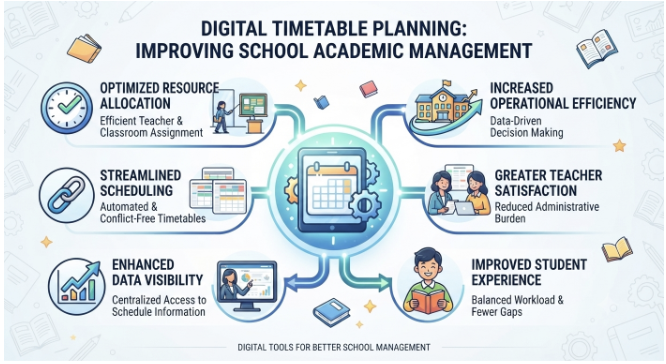
Why Is School Timetable Planning Challenging?
Every school has different scheduling requirements depending on its number of classes, subjects, teachers, and available infrastructure.
Some common challenges include:
- Teacher availability: Ensuring that teachers are assigned to periods when they are available.
- Classroom allocation: Preventing multiple classes from being assigned to the same classroom simultaneously.
- Subject distribution: Maintaining an appropriate balance of subjects throughout the week.
- Multiple sections: Coordinating schedules for different classes and sections.
- Last-minute changes: Managing timetable adjustments caused by teacher absences, events, or other unexpected situations.
- Administrative workload: Spending hours preparing, checking, and updating schedules.
Without a structured process, these responsibilities can become difficult to manage, particularly in schools with multiple sections and large teaching teams.
6 Ways Digital Timetable Planning Improves School Management
1. Simplifies Teacher and Subject Allocation
Teachers often handle multiple subjects or different sections throughout the school day. Assigning periods without checking availability can result in overlapping responsibilities.
A digital scheduling system helps administrators organize teacher assignments and subject requirements in a structured format.
Before finalizing the timetable, schools can review:
-
Teacher availability.
-
Subjects assigned to each teacher.
-
Class and section requirements.
-
Weekly teaching periods.
-
Available time slots.
This makes it easier to identify scheduling problems and maintain a more balanced academic routine.
2. Reduces Classroom Scheduling Conflicts
Classroom availability is another important consideration during timetable preparation.
For example, science laboratories, computer rooms, and activity spaces may be shared between multiple sections. Assigning these resources without proper coordination can interrupt planned lessons.
A centralized scheduling process allows administrators to consider classroom availability while preparing academic schedules.
This helps schools use their infrastructure more effectively and reduce unnecessary scheduling conflicts.
3. Makes Timetable Changes Easier
School schedules are not always fixed throughout the academic year. Teacher leave, examinations, school events, and special academic activities may require temporary or permanent adjustments.
When schedules are maintained manually, administrators may need to update several documents and communicate changes separately.
Digital timetable management makes it easier to maintain updated schedules and share relevant changes with teachers and other authorized users.
This reduces confusion and helps everyone follow the latest academic routine.
4. Improves Teacher Workload Distribution
An effective timetable should consider more than the number of periods assigned to each teacher.
Schools should also consider subject distribution, consecutive periods, preparation time, and weekly teaching responsibilities.
A structured scheduling approach helps administrators review teacher assignments and identify uneven workloads.
For example, if one teacher receives several consecutive periods while another has an uneven distribution throughout the week, administrators can review the allocation and make suitable adjustments.
Balanced scheduling can support better classroom preparation and improve coordination among teaching staff.
5. Provides Better Coordination Between Departments
Academic scheduling involves multiple departments, including school administration, teaching staff, examination teams, and academic coordinators.
When everyone works with different versions of a timetable, communication gaps can develop.
A centralized digital system provides a consistent reference for authorized users.
Teachers can check their assigned periods, administrators can review class schedules, and academic coordinators can manage planned activities more efficiently.
This improves communication and reduces dependency on repeated manual updates.
6. Supports Better Academic Planning
A well-organized timetable helps schools distribute subjects and academic activities more effectively.
Administrators can review whether important subjects receive sufficient periods and whether practical activities, library sessions, sports, and other activities are appropriately scheduled.
This creates a more structured academic routine and helps schools maintain consistency throughout the session.
Important Features to Consider in a Digital School Scheduling System
Before selecting a scheduling solution, school administrators should evaluate the features that support their academic requirements.
Teacher Allocation: The system should help organize teaching responsibilities and assigned periods.
Class and Section Management: Administrators should be able to maintain separate schedules for different classes and sections.
Classroom Management: Classroom and special facility availability should be considered during scheduling.
Timetable Updates: Changes should be easy to manage and communicate to relevant users.
User-Based Access: Teachers, coordinators, and administrators should have access to the information relevant to their responsibilities.
Schedule Accessibility: Teachers should be able to check their schedules conveniently through an accessible digital platform.
Reporting: Administrators should be able to review teaching assignments and academic schedules.
The right combination of features depends on the institution's size, academic structure, and scheduling requirements.
How VidyalayBox Supports Smarter Academic Administration
Managing academic schedules alongside attendance, admissions, examinations, and student information can become challenging when schools use separate tools for each activity.
VidyalayBox provides an integrated school management software in Bihar designed to simplify everyday institutional operations.
Its academic and administrative capabilities help schools organize important activities through a centralized digital environment.
With VidyalayBox, educational institutions can benefit from:
-
Organized class and section management.
-
Digital academic timetable management.
-
Teacher and staff coordination.
-
Attendance and academic record management.
-
Examination and report card management.
-
Centralized administrative information.
-
Accessible dashboards for relevant users.
By connecting different school operations, VidyalayBox helps administrators reduce fragmented workflows and improve coordination across departments.
Schools can explore its features to understand how a centralized platform can support their academic and administrative requirements.
Best Practices for Creating an Effective School Timetable
Technology can make scheduling easier, but proper planning remains essential.
School administrators can follow these practices:
1. Understand academic requirements: List subjects, weekly periods, practical sessions, and special activities before creating the timetable.
2. Review teacher availability: Understand each teacher's subject responsibilities and available working hours.
3. Check classroom resources: Consider laboratories, computer rooms, libraries, and other shared facilities.
4. Distribute subjects carefully: Avoid unnecessarily concentrating demanding subjects into a limited number of days.
5. Review the final schedule: Check for overlapping assignments, unavailable classrooms, and uneven teaching workloads.
6. Communicate updates: Ensure teachers and relevant staff receive the latest timetable.
7. Review periodically: Make adjustments when academic requirements or institutional schedules change.
Following these practices can help schools maintain a more reliable academic routine.
##Conclusion
Effective timetable planning is an important part of successful school administration. Poor scheduling can create teacher allocation problems, classroom conflicts, communication gaps, and unnecessary administrative work.
Digital scheduling solutions help schools organize academic activities, manage teaching responsibilities, and respond to timetable changes more efficiently.
VidyalayBox brings academic and administrative management together through an integrated school management platform. Schools looking to improve scheduling, coordination, and everyday operations can explore its digital capabilities to create a more organized academic environment.
A well-planned timetable does more than organize classroom periods. It helps teachers prepare better, administrators coordinate effectively, and students follow a consistent learning routine.
Frequently Asked Questions (FAQs)
1. What is school timetable management software?
School timetable management software is a digital solution that helps educational institutions organize class schedules, teacher assignments, subjects, classrooms, and academic periods.
2. How does digital timetable planning reduce administrative work?
It simplifies schedule creation, makes changes easier to manage, and reduces the need to repeatedly update multiple spreadsheets or paper documents.
3. Can schools manage multiple class sections through a digital timetable?
Yes. A suitable system can help administrators organize separate schedules for different classes and sections while coordinating teacher and classroom availability.
4. Why is teacher workload distribution important in timetable planning?
Balanced workload distribution helps prevent unnecessary consecutive periods, improves teaching coordination, and gives teachers better opportunities to prepare for their classes.
5. How does VidyalayBox help schools with academic management?
VidyalayBox offers school management capabilities covering academic timetables, attendance, admissions, examinations, fee management, and parent communication through a centralized platform.
Related Articles & Guides
Smart School Management Software for Patna Schools
Simplify admissions, attendance, fee collection and parent communication with smart school management software designed for modern schools.
How School Admission Software Simplifies Enrolment
Discover how school admission management software helps schools simplify applications, organize student records, reduce paperwork and improve enrolment.
School Timetable Management Software for Smarter Planning
Simplify school scheduling with smart timetable management. Reduce teacher workload, avoid scheduling conflicts, and improve daily academic operations.