School Timetable Management Software for Better Scheduling
Preparing school timetables manually can create scheduling conflicts, uneven teacher workloads, and classroom allocation problems. Discover how digital timetable management helps schools organize periods, assign teachers, manage classrooms, and simplify academic planning.

VidyalayBox Team
Education Technology Team
School Timetable Management: How Schools Can Reduce Scheduling Conflicts and Improve Teacher Productivity
Preparing a school timetable is one of the most important administrative responsibilities at the beginning of every academic session. School administrators must coordinate subjects, teachers, classrooms, periods, and student sections while ensuring that daily academic activities run smoothly.
For schools managing multiple classes and a large teaching staff, preparing these schedules manually can become complicated. A single scheduling mistake may result in two classes being assigned to the same teacher, classroom availability issues, or an uneven distribution of teaching periods.
Traditional spreadsheets and paper-based timetables can make these challenges more difficult to manage, especially when schools need to make frequent changes.
Digital timetable management provides a more organized approach to academic scheduling. It helps institutions coordinate teaching activities, manage resources, and maintain updated schedules.
Let's understand how schools can improve their timetable planning process.
1. Why Is School Timetable Planning Challenging?
Creating a timetable requires more than assigning subjects to different periods. Administrators must consider several factors simultaneously.
Some common challenges include:
Teacher Availability: Teachers may handle multiple subjects or different classes. Their availability needs to be considered before assigning periods.
Classroom Allocation: Schools must ensure that classrooms and specialized facilities are available when required.
Subject Distribution: Important subjects need to be distributed appropriately throughout the week.
Multiple Sections: Schools with multiple sections must coordinate teachers and classrooms without overlapping schedules.
Last-Minute Changes: Teacher absences, examinations, school events, and other unexpected situations can require timetable adjustments.
Managing these responsibilities manually increases the possibility of errors and consumes valuable administrative time.
2. How Digital Timetable Management Simplifies Scheduling
A digital timetable management system helps schools organize academic schedules through a centralized platform.
Instead of maintaining separate schedules for teachers, classrooms, and student sections, administrators can manage scheduling information in one place.
Important benefits include:
-
Organizing daily and weekly class schedules.
-
Assigning teachers to specific subjects and periods.
-
Managing classroom availability.
-
Identifying scheduling overlaps.
-
Updating timetables when changes are required.
-
Providing teachers with access to their schedules.
A centralized scheduling process makes it easier for administrators to maintain consistency across academic departments.
3. Essential Features of School Timetable Management Software
When selecting a digital scheduling solution, schools should consider features that address their actual administrative requirements.
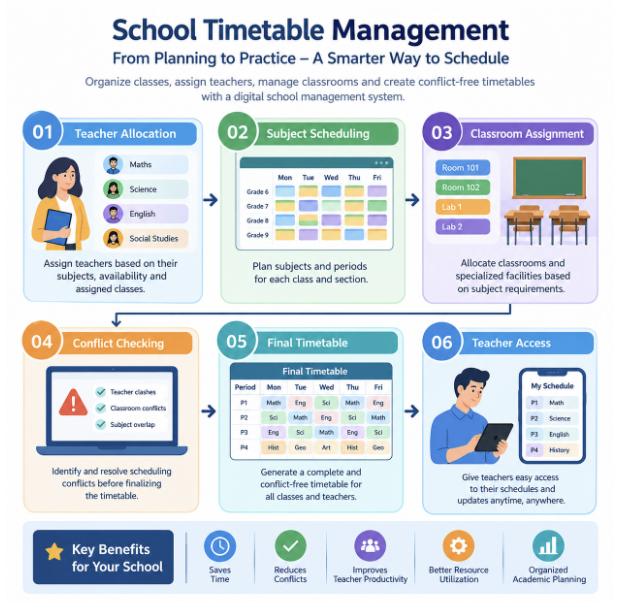
Teacher Allocation
The system should allow administrators to assign teachers according to their subjects, availability, and assigned classes.
This helps reduce overlapping assignments and makes workload planning easier.
Class and Section Scheduling
Schools often operate multiple sections within the same grade.
A scheduling system should support separate timetables for different classes and sections while maintaining a centralized overview.
Period Management
Administrators should be able to define school timings, working days, break periods, and the number of teaching periods.
This creates a consistent structure for daily academic activities.
Classroom Management
Classroom allocation is particularly important for schools with limited space or specialized facilities.
A digital system can help administrators organize classroom assignments and identify conflicting bookings.
Timetable Updates
Academic schedules may change because of teacher availability, school events, or other operational requirements.
Administrators should be able to update schedules and communicate relevant changes to teachers.
Substitute Teacher Allocation
When a teacher is unavailable, administrators may need to arrange a substitute.
A well-organized scheduling process helps identify available teachers and assign replacement responsibilities without creating additional timetable conflicts.
4. How Schools Can Avoid Common Timetable Scheduling Mistakes
A well-planned timetable improves academic coordination and reduces unnecessary disruptions.
Here are some practical steps schools should follow.
1. Collect Accurate Teacher Information
Maintain updated information about teacher qualifications, assigned subjects, availability, and existing responsibilities.
2. Define Academic Requirements
Determine the number of periods, subjects, working days, and classroom requirements for each class.
3. Check Teacher Workloads
Distribute teaching periods appropriately and avoid assigning excessive consecutive classes wherever possible.
4. Identify Scheduling Conflicts
Review teacher, classroom, and class schedules before finalizing the timetable.
5. Keep Schedules Updated
Make sure teachers and relevant staff members have access to the latest timetable whenever changes occur.
6. Review Scheduling Performance Periodically review workload distribution, resource utilization, and scheduling problems to improve future planning.
These practices help schools maintain a more organized academic environment.
5. Why Manual Timetable Management Becomes Difficult as Schools Grow
A small school may initially manage its timetable using spreadsheets or printed documents.
However, as student enrolment increases and more teachers, sections, and academic activities are introduced, scheduling becomes more complicated.
Consider a school with multiple grades, several sections, and dozens of teachers.
Every timetable change may require administrators to update multiple documents and communicate the changes to different departments.
This can result in:
-
Outdated timetable copies.
-
Repeated manual corrections.
-
Confusion about teacher assignments.
-
Classroom scheduling conflicts.
-
Delayed communication.
-
Additional administrative workload.
Digital scheduling helps schools maintain more consistent information and reduces their dependence on disconnected documents.
6. How School ERP Software Supports Academic Scheduling
Timetable management becomes more useful when connected with other school administration activities.
A Best school ERP platform in Bihar can bring academic scheduling together with related functions such as:
-
Teacher and staff information.
-
Student and class records.
-
Attendance management.
-
Homework and assignments.
-
Examination planning.
-
Academic reporting.
-
Role-based access for school staff.
This creates a more connected administrative environment.
For example, teachers can access their assigned schedules while administrators manage academic activities through a centralized system.
Schools should evaluate whether their software supports the scheduling features and integrations required for their specific academic structure.
7. How VidyalayBox Helps Schools Manage Academic Operations
Managing academic schedules alongside everyday school responsibilities requires an organized digital platform.
VidyalayBox offers school management capabilities designed to simplify administrative and academic operations.
Its platform includes features such as student information management, homework and assignments, attendance, examinations, lesson planning, and smart timetable functionality.
With an integrated school management platform, institutions can work towards:
-
Better organization of academic activities.
-
Improved coordination between teachers and administrators.
-
Centralized access to important school information.
-
Reduced dependence on manual administrative processes.
-
More organized academic planning.
VidyalayBox is designed to support schools looking to modernize their administrative processes and manage their academic operations through a connected digital platform.
Want to simplify academic planning at your school? Explore VidyalayBox and discover how its school management solutions can help your institution organize everyday operations more effectively.
Conclusion
School timetable planning requires coordination between teachers, classrooms, subjects, periods, and academic departments. When these activities are managed manually, even small scheduling changes can create unnecessary complications.
Digital timetable management provides schools with a structured way to organize academic schedules, reduce overlapping assignments, and improve coordination.
By adopting suitable school management software, educational institutions can simplify scheduling and create a more organized working environment for teachers and administrators.
VidyalayBox helps schools move towards connected digital administration with features designed to support academic planning and everyday institutional operations.
Frequently Asked Questions (FAQs)
1. What is school timetable management software?
School timetable management software is a digital solution that helps educational institutions prepare, organize, and manage class schedules, teacher assignments, subjects, periods, and classroom allocations.
2. How does automated timetable management help teachers?
It gives teachers access to organized schedules, reduces confusion about class assignments, and helps administrators coordinate teaching responsibilities more efficiently.
3. Can school timetable software manage multiple classes and sections?
Yes. Suitable scheduling systems can support multiple grades, sections, subjects, teachers, and classrooms while helping administrators identify scheduling overlaps.
4. How can schools manage timetable changes when a teacher is absent?
Schools can review teacher availability and arrange substitute assignments. A centralized scheduling system can help administrators communicate updated responsibilities and reduce scheduling conflicts.
5. Why should schools use timetable management as part of school ERP software? Integrating timetable management with school ERP software helps connect academic scheduling with teacher information, student records, attendance, examinations, and other administrative activities. This reduces the need to maintain separate systems.
Related Articles & Guides
Smart School Management Software for Patna Schools
Simplify admissions, attendance, fee collection and parent communication with smart school management software designed for modern schools.
How School Admission Software Simplifies Enrolment
Discover how school admission management software helps schools simplify applications, organize student records, reduce paperwork and improve enrolment.
School Timetable Management Software for Better Planning
Discover how digital timetable management helps schools organize classes, allocate teachers, avoid scheduling conflicts, and improve academic planning.